Download
Install Reqad in one command
Reqad installs on a fresh Rocky Linux, AlmaLinux or RHEL 8/9 server with a single command - it sets up your web server (nginx or Apache), PHP, MariaDB and SSL for you. The installer detects your OS and asks for your options in a small terminal UI. Mail (exim, dovecot and Roundcube) is optional and off by default. During early access, register first so we can allow-list your server.
Requirements
- A Rocky Linux 8/9, AlmaLinux 8/9 or RHEL 8/9 VPS (a fresh, clean install)
- x86_64 (64-bit Intel/AMD) architecture - the only architecture supported
- root access over SSH
- An IPv4 address with reverse DNS (PTR) set to the server's hostname - Reqad issues a Let's Encrypt certificate on that hostname (how to set reverse DNS)
- 1 GB RAM minimum (2 GB+ recommended)
1. Register & get your server allow-listed
Reqad is in early access and the install repository is access-controlled. Create a free account, confirm your email, then add your server's public IP address on your account page - it's allow-listed within a minute or two. Not sure of the IP? Run curl -4 ifconfig.me on the server.
2. Run the installer
Once your server's IP is allow-listed, run this as root on the fresh server. The same command works on EL8 and EL9 - it detects which one you are on:
bash <(curl -sSL https://repo.reqad.net/install.sh)
The installer opens a small terminal UI showing what it detected, and lets you choose the web server, PHP version, whether to install mail, the SSH port and the timezone. Move with the arrow keys, press Enter to change a value, then select Start installation.
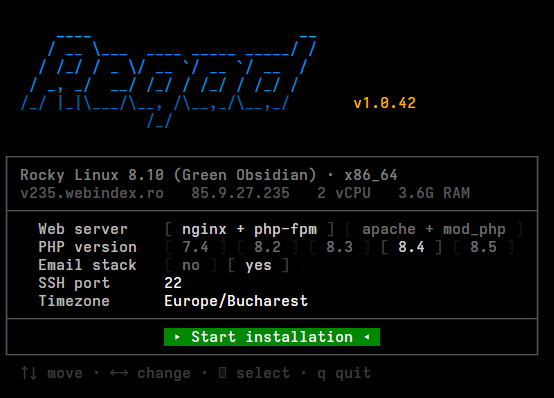
Unattended (optional): pass any option and the installer skips the UI, using defaults for anything you leave out:
bash <(curl -sSL https://repo.reqad.net/install.sh) \
  --template nginx_php-fpm \
  --php 8.3 \
  --email \
  --ssh-port 1922 \
  --timezone 'Europe/Bucharest'
--template selects the stack: nginx_php-fpm (default) or apache_modphp · --php sets the PHP version (default 8.3) · --email installs exim, dovecot and Roundcube - left out, the mail stack is skipped and the panel's email section is hidden · --ssh-port hardens SSH to a non-default port · --timezone sets the server clock (defaults to whatever the server already uses) · -y accepts every default · --dry-run prints what would happen and changes nothing · --help lists them all.
3. Or add the RPM repository
Prefer to install from the package manager? Add the Reqad yum repository and install:
sudo dnf install -y https://repo.reqad.net/reqad-release.rpm
sudo dnf install -y reqad
4. Open the panel
When the installer finishes it prints your panel URL and credentials. Open https://your-server:2087/ and sign in.
Use a brand-new Rocky Linux 8/9, AlmaLinux 8/9 or RHEL 8/9 VPS with nothing else installed. The installer can only reach the repository once your server's IP is allow-listed - so make sure you've registered and sent us the IP first.