Installation
Install Reqad on a fresh Rocky Linux 8/9, AlmaLinux 8/9 or RHEL 8/9 VPS. One command covers every supported release - the installer detects your OS, asks what you want in a small terminal UI, then configures the web server, PHP, MariaDB and SSL. The mail stack (exim, dovecot and Roundcube) is optional and off by default.
Requirements
| Item | Requirement |
|---|---|
| OS | Rocky Linux 8/9, AlmaLinux 8/9 or RHEL 8/9 (clean install) |
| Architecture | x86_64 (64-bit) only |
| Access | root over SSH |
| Hostname | A fully qualified name (e.g. srv1.example.com) with a DNS A record pointing to the server - see Hostname and reverse DNS |
| RAM | 1 GB minimum, 2 GB+ recommended |
| Disk | 20 GB+ recommended |
Hostname and reverse DNS
Set the server's hostname before you install. Reqad needs a fully qualified name that resolves in public DNS to the server's IP address: the panel is reached at that name and its Let's Encrypt certificate is made for it. localhost, single words like myvps and local-only names (.local, .localdomain) can't be used.
hostnamectl set-hostname srv1.example.com
host srv1.example.com     # must show the server's public IP
host 203.0.113.10         # reverse DNS of the IP - should show srv1.example.com
- A record: create it at your DNS provider,
srv1.example.com→ the server's IP. - Reverse DNS (PTR): set it in your hosting provider's control panel, to the same name. If the hostname can't be used, the installer takes the reverse DNS name instead, as long as that name passes the same check. If you install the mail stack, a matching PTR also helps your mail get delivered, since many mail servers check it.
If the hostname doesn't pass, the installer stops at the start, before installing Reqad, and tells you what to fix. Behind NAT the name may point to a public address the server doesn't see itself: the installer only warns about that, and the certificate for the name works as long as ports 80 and 443 on that address reach the server.
Run the installer
As root on the fresh server:
bash <(curl -sSL https://repo.reqad.net/install.sh)
The installer checks the server, then opens a terminal UI:
┌──────────────────────────────────────────────────────────┐
│ Rocky Linux 9.4 (Blue Onyx) · x86_64                     │
│ srv1.example.com   203.0.113.10   4 vCPU   7.8G RAM      │
├──────────────────────────────────────────────────────────┤
│ ▸ Web server    [ nginx + php-fpm ] [ apache + mod_php ] │
│   PHP version   [ 7.4 ] [ 8.2 ] [ 8.3 ] [ 8.4 ] [ 8.5 ]  │
│   Email stack   [ no ] [ yes ]                           │
│   SSH port      22                                       │
│   Timezone      Europe/Bucharest                         │
├──────────────────────────────────────────────────────────┤
│                    Start installation                    │
└──────────────────────────────────────────────────────────┘
  ↑↓ move · ←→ change · ⏎ select · q quit
Move between settings with ↑ ↓ and change a value with ← →. Press Enter on SSH port to type a port, or on Timezone to search the list. When you are happy, select Start installation. q quits without changing anything.
Choosing the web server
The first choice in the installer is the web server template. It decides which program answers on ports 80 and 443 and how PHP runs. Choose nginx + php-fpm, the default, unless your sites need Apache's .htaccess files.
| nginx + php-fpm | apache + mod_php | |
|---|---|---|
| Template | nginx_php-fpm (default) | apache_modphp |
| Ports 80 and 443, static files | nginx | Apache |
| PHP | Each account's own PHP-FPM pool, running as the account | Inside Apache (mod_php), as the account. An account on another PHP version gets its own PHP-FPM pool. |
.htaccess files | Ignored | Read |
| WordPress page cache | Yes | No |
WordPress Toolkit's web server rules (block xmlrpc.php, no PHP in uploads, login only from your IPs...) | Yes | No (only the measures inside WordPress) |
| Node.js & Python apps | Yes | No |
| Git deployments on every push (webhook) | Yes | No, press Deploy after a push |
| Limiting who can open a staging copy | Yes | No |
Why nginx
- The WordPress page cache. nginx keeps the finished pages of a WordPress site and sends them again without running PHP or asking the database. A cached page takes a few milliseconds instead of a few hundred, and the site stays fast when many visitors come at once. Logged-in users, comments, the cart, checkout and
wp-adminare never cached, and the cache empties itself when content changes. Turn it on per site in the WordPress Toolkit (Performance). - Less memory. A few nginx processes serve thousands of connections. With mod_php, every open connection holds a whole Apache process with PHP loaded in it, even one that only sends an image or waits for a slow visitor. On a VPS with 1 or 2 GB of RAM this decides how many visitors fit.
- Sites stay apart. Every account has its own PHP-FPM pool, with its own PHP version, settings and limits. A busy or broken site uses up its own pool, not the PHP of the other sites.
- More of Reqad works. The features marked "No" in the table above need nginx in front.
wp-admin always run PHP. With Apache and mod_php, every page view runs PHP and queries the database.WordPress, Laravel, Symfony and most PHP applications run on nginx without changes: Reqad writes the rules for pretty URLs into each site's configuration. What does not carry over are rules a site keeps in .htaccess, such as old rewrite rules, redirects or a password-protected folder. Reqad has its own tools for some of them: password protection, and redirects in the account panelPremium.
If your sites need .htaccess
Install with nginx anyway and add Apache behind nginxPremium from Reqad Hosting Pro. nginx stays in front for the certificates and static files, and Apache reads each site's .htaccess. The WordPress page cache and the other features in the table work there too, and you can switch back to nginx alone at any time from the panel.
Choose apache + mod_php only if you cannot use the add-on and your sites must have their .htaccess rules.
Changing later
A server installed with apache + mod_php can move to nginx + php-fpm with a script. Run it first with --dry-run: it builds the new configuration without changing anything and lists every .htaccess file that nginx will ignore, so you can check what each one did.
/usr/local/reqad/scripts/convert_apache_to_nginx.sh --dry-run
/usr/local/reqad/scripts/convert_apache_to_nginx.sh
It gives every account a PHP-FPM pool with the PHP settings it had, writes the nginx sites, and switches over only when every configuration test passes. If one fails, everything is put back. There is no script for the other direction: to read .htaccess files on an nginx server, use Apache behind nginx.
Installer options
Pass any option and the installer runs unattended - no UI - using the defaults below for anything you leave out. This is what you want for scripted or repeated installs.
| Option | Default | What it does |
|---|---|---|
--template | nginx_php-fpm | Web server stack: nginx_php-fpm or apache_modphp. See Choosing the web server. |
--php | 8.3 | PHP version to install: 7.4, 8.2, 8.3, 8.4 or 8.5. |
--email / --no-email | off | Install exim, dovecot and Roundcube. Left out, the mail stack is skipped and the panel's email section is hidden. |
--ssh-port | 22 | Moves SSH to a non-default port. Password logins are turned off when root has an SSH key in /root/.ssh/authorized_keys; without one they are left as they are, so you cannot be locked out. |
--timezone | keeps the server's current setting | Sets the server clock, e.g. Europe/Bucharest. |
--skip-update | — | Skips the initial system update and package install. |
-y, --yes | — | Runs with every default, no UI. |
--dry-run | — | Prints what would be installed and changes nothing. |
--help | — | Lists every option. |
For example, to install PHP 8.4 with the mail stack on a custom SSH port, without the UI:
bash <(curl -sSL https://repo.reqad.net/install.sh) \
  --php 8.4 \
  --email \
  --ssh-port 1922
--email (or selecting yes in the UI) the installer does not set up exim or dovecot, and the server will not send or receive mail. You can run the installer again later with --email to add it.install-el8.sh and install-el9.sh scripts, and the SSH_PORT / TIMEZONE / TEMPLATE / PHP_VERSION / WITH_EMAIL environment variables they read, are replaced by the single install.sh and the options above. Exported variables are ignored by the new installer - use the matching option instead.Premium installerPremium
With a premium subscription, use the premium installer instead. First add the server's public IP address on your account page and click Upgrade to Premium next to it; the premium repository opens for it within a minute or two. Then, as root:
bash <(curl -sSL https://repo.reqad.net/install-premium.sh)
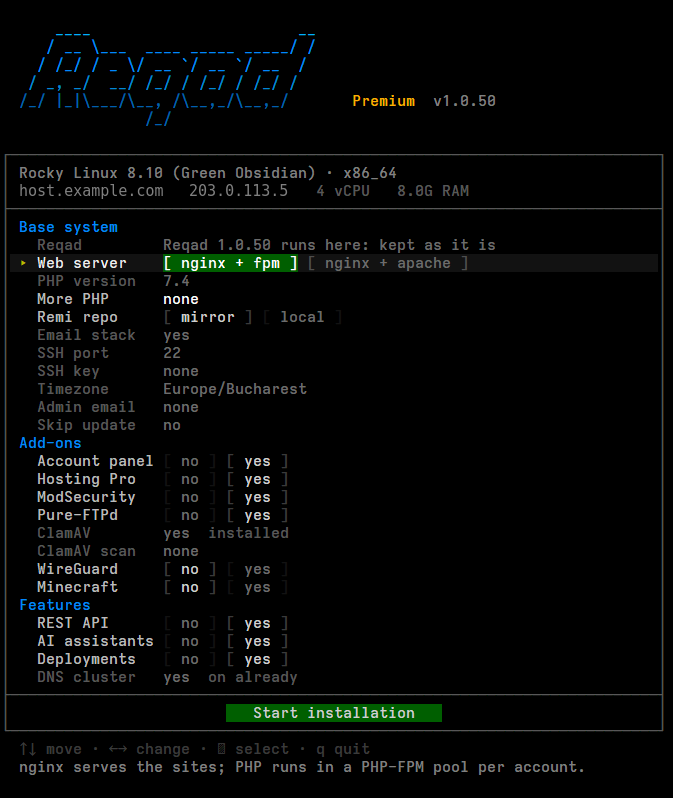
It shows the same form as the free installer, with the add-ons added to it. On a new server it installs Reqad first (with the free installer, using your choices), then turns on the premium repository and installs the add-ons. On a server that already runs Reqad it sees that and only adds what is missing, so it is safe to run again later. Every add-on is installed unless you untick it, except WireGuard, Minecraft and the malware scanner, which are installed only when you ask for them. What each add-on does: Plugins & add-ons.
As with the free installer, any option runs it without the form. The options of the free installer work here too, plus:
| Option | What it does |
|---|---|
--template nginx_apache_php-fpm | Apache behind nginx, from Hosting Pro (see If your sites need .htaccess). |
--php-extra | More PHP versions next to the default one, e.g. 7.4,8.4. Older versions down to 5.6 are available. |
--addons-only | Reqad is installed already: only add the premium parts. |
--no-account-panel, --no-hosting-pro, --no-modsecurity, --no-pureftpd, --no-clamav | Leave that add-on out. |
--wireguard, --minecraft | Also install WireGuard or the Minecraft server. |
--imunifyav | Also install the malware scanner with CloudLinux's free ImunifyAV (about 512 MB of memory). |
--no-api, --no-mcp, --no-deployments | Leave out the REST API, AI assistants (MCP), or Git deployments and apps. Each one is installed switched off; you turn it on in Settings. |
--help | Lists every option. |
For example, to add Minecraft to a server that already has the other add-ons:
bash <(curl -sSL https://repo.reqad.net/install-premium.sh) --addons-only --minecraft
If the installer stops with "the premium repository refused this server", the IP address is not marked Premium on your account page yet, or the subscription has ended. Its log is kept at /var/tmp/reqad-install/install_premium.log.
From the RPM repository
sudo dnf install -y https://repo.reqad.net/reqad-release.rpm
sudo dnf install -y reqad
After installation
The installer prints your panel URL and login details when it finishes. Open https://your-server:2087/ and sign in on the login page. From there you can create your first hosting account.
Then open Settings › Security: change the generated password, and turn on two-factor authentication or passkeys - see Panel login & 2FA. Lost the printed password? Run reqad auth passwd on the server.
A full log of the run is kept at /var/tmp/reqad-install/install_reqad.log.
Need a hand? Create a free account or contact us.