Reqad Reseller Premium

Sell hosting through resellers

Turn any hosting account into a reseller. Resellers get a panel of their own at https://your-server:2085/, where they create and look after their clients' accounts, make their own packages and use their own name servers and brand - within the limits you set.

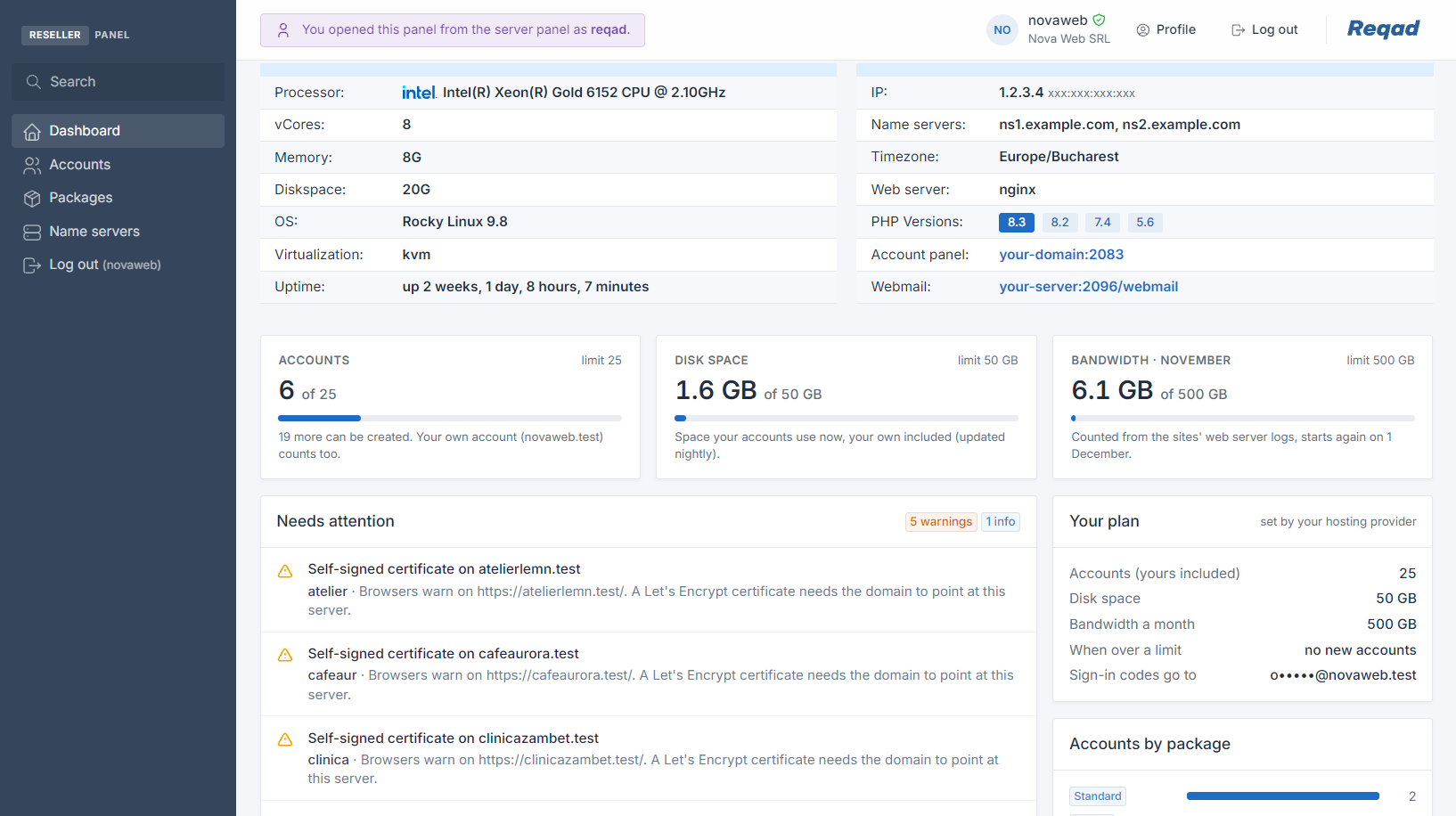
Reqad reseller panel dashboard - server information, accounts, disk space and bandwidth against the reseller's limits, and what needs attention
The reseller panel's dashboard, opened by the server admin from the server panel.
  1. You run the server and the server panel (port 2087). You make an account a reseller and give it limits and packages.
  2. Your reseller signs in to the reseller panel (port 2085) and creates accounts for their own clients.
  3. Their clients manage their sites, email and WordPress in the Account Panel (port 2083), with the reseller's name on it.

What resellers get

A hosting business of their own, on your server

Everything a reseller needs to look after their clients, without access to the server panel or to anyone else's accounts.

Hosting accounts

Create and manage their clients' accounts.

  • New account: domain, user name, package, PHP version and IP address
  • DNS zone, Let's Encrypt certificate, www alias and email set up at the same time
  • A welcome email to the client, with their panel and webmail addresses
  • Change the package, password, contact address or IP address
  • Suspend with a reason, lift it, or delete an account
  • Search all their accounts by domain or user name

Log in as the client

Open any client's Account Panel in one click.

  • No password needed: a single-use ticket opens the panel on port 2083
  • See exactly what the client sees, and fix it for them

Their own packages

Plans they sell, with their own names and colors.

  • Disk space, monthly bandwidth and mailbox size
  • How many mailboxes, databases, domains, cron jobs and apps
  • Shell access, CPU, memory and database connections
  • Which parts of the Account Panel each package offers
  • Plus the packages you give them, read-only
  • A default package for new accounts

Private name servers

ns1 and ns2 under their own domain, instead of the server's.

  • Up to six names, with the addresses of the server's name servers
  • Checks that each name already points to the right place
  • Shows what to register at the domain's registrar (glue records)
  • Switches the zones of all their accounts in one click

Their own brand

Their clients see the reseller, not you.

  • Their company name in the clients' Account Panel menu and footer
  • The same name as the sender of the notices clients receive
  • Their support line on the client's Home page
  • A Help link to their own help pages

Dashboard

Their plan and their clients' accounts on one page.

  • Accounts, disk space and this month's bandwidth against their limits
  • A warning at 90% and when a limit is reached
  • Accounts by package
  • Needs attention: problems in their clients' accounts, worst first

Server information

What they need to tell their clients.

  • Server name, IP addresses, name servers, panel and webmail addresses
  • PHP versions, web server, processor, memory, disks and uptime
  • Whether websites, email, databases, DNS and FTP are running
  • Nothing about other customers or the server's load

Secure sign-in

Every sign-in has two steps.

  • Their password, then a code from their authenticator app
  • Or a code emailed to the address you set for them
  • No code asked on a browser they choose to trust, for a while
  • Separate from their own Account Panel: one never opens the other

For you, the server admin

You stay in control

Each reseller gets exactly what you give them, and the server stays yours.

Limits for each reseller

The number of accounts, the disk space and the monthly bandwidth of all their accounts together, their own included. Over a limit, you choose: refuse new accounts, or just warn them. Their clients' sites keep running either way.

You choose the packages

Give each reseller the server packages they may use. Let them make their own too, if you want, held to the maximums you set and to their own limits.

You choose the Account Panel parts

Decide which parts of the Account Panel a reseller may give their clients. What you leave out, they cannot turn on.

IP addresses

Give a reseller a shared IP address for their accounts and dedicated addresses they can give to a single client.

Open their panel from yours

One click in the server panel (port 2087) opens a reseller's panel. What you change there is logged under your name.

Kept apart

A reseller sees only their own accounts. They lift only the suspensions they made, never yours. Take away the privilege or suspend the reseller and their sessions end at once.
Built on the other Premium add-ons.

A reseller's packages are Hosting Pro packages, with the same limits, quotas and bandwidth rules. Their clients use the Account Panel and their mailbox owners Webmail Home. All of them are included in Premium.

Ready to grow through resellers?

Reqad Reseller is included in the Premium subscription. Not sure you need it? Compare the versions.